Another thing I learned while diagnosing my warping 3D prints was VFAs or Vertical Fine Artifacts. I came across Prusa’s post about this a few weeks ago, but didn’t bother to read it detail. That is until I was diagnosing the warping on my new Core One+. I was printing multiple instances of the same gridfinity box and varying temperature and fan settings to see what could fix the warping. But, then in one set of experiments, I noticed that the box had that charateristic shiny lines that “glide” across the surface as you change your viewing angle. My previous prints didn’t and that started yet another yak shave.
I finally read through the article and learned about the Consistent Surface setting, but more importantly the new BALANCED profile that was introduced to not break backcompat. What’s cool is that they found that the Core One actually had some reasonance that shows up as these artifacts when the printing speed slows down (especially around corners).
It turned out that I had changed profiles from SPEED to STRUCTURAL while running my tests, because I had switch machines that I was running the slicer on. The VFAs were very pronounced on the STRUCTURAL profile. I looked at the slicer result using the Actual Speed View as suggested in the article and it was clear that portions of the print that were faster didn’t suffer from the artifacts. It was kinda wild, for the first time, I had some idea for why the apperance of a print would vary across a single surface.
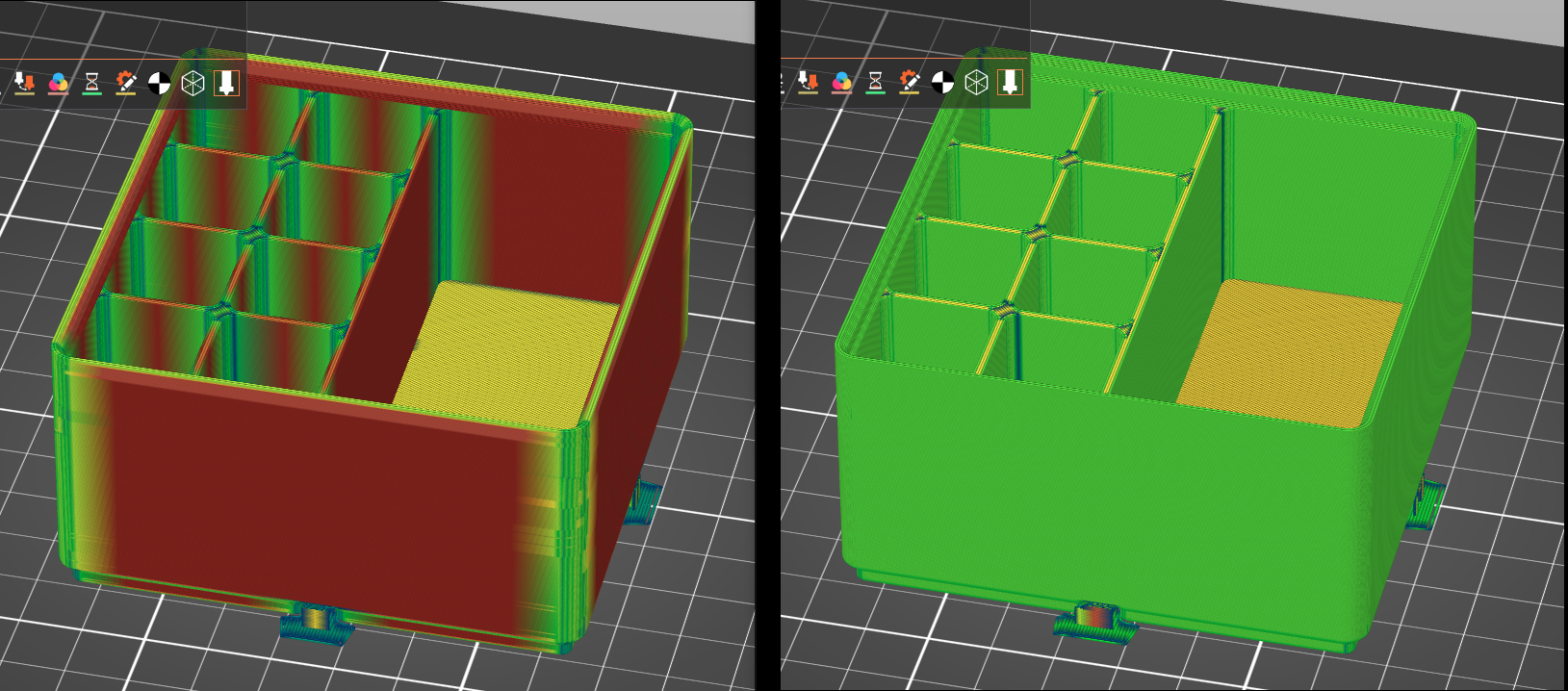
I then tried the new BALANCED profile and VFAs were mostly eliminated except around the corners when the print head slows down.